内存管理篇————虚拟内存管理

对于操作系统来讲,想要实现多线程/进程,就必须要实现隔离,Linux 为每一个进程都配套了一个独立的地址空间,这样进程之间互不干涉。

1 虚拟内存管理的数据结构

1.1 用户虚拟地址空间

下面的 struct mm_struct 和 struct vma_area_struct 用来描述进程的用户虚拟地址空间

对于进程我们采用 struct task_struct 来进行描述。

https://elixir.bootlin.com/linux/v7.1-rc7/source/include/linux/sched.h#L820

1
2
3
4
5
struct task_struct {
......
struct mm_struct *mm;
......
}

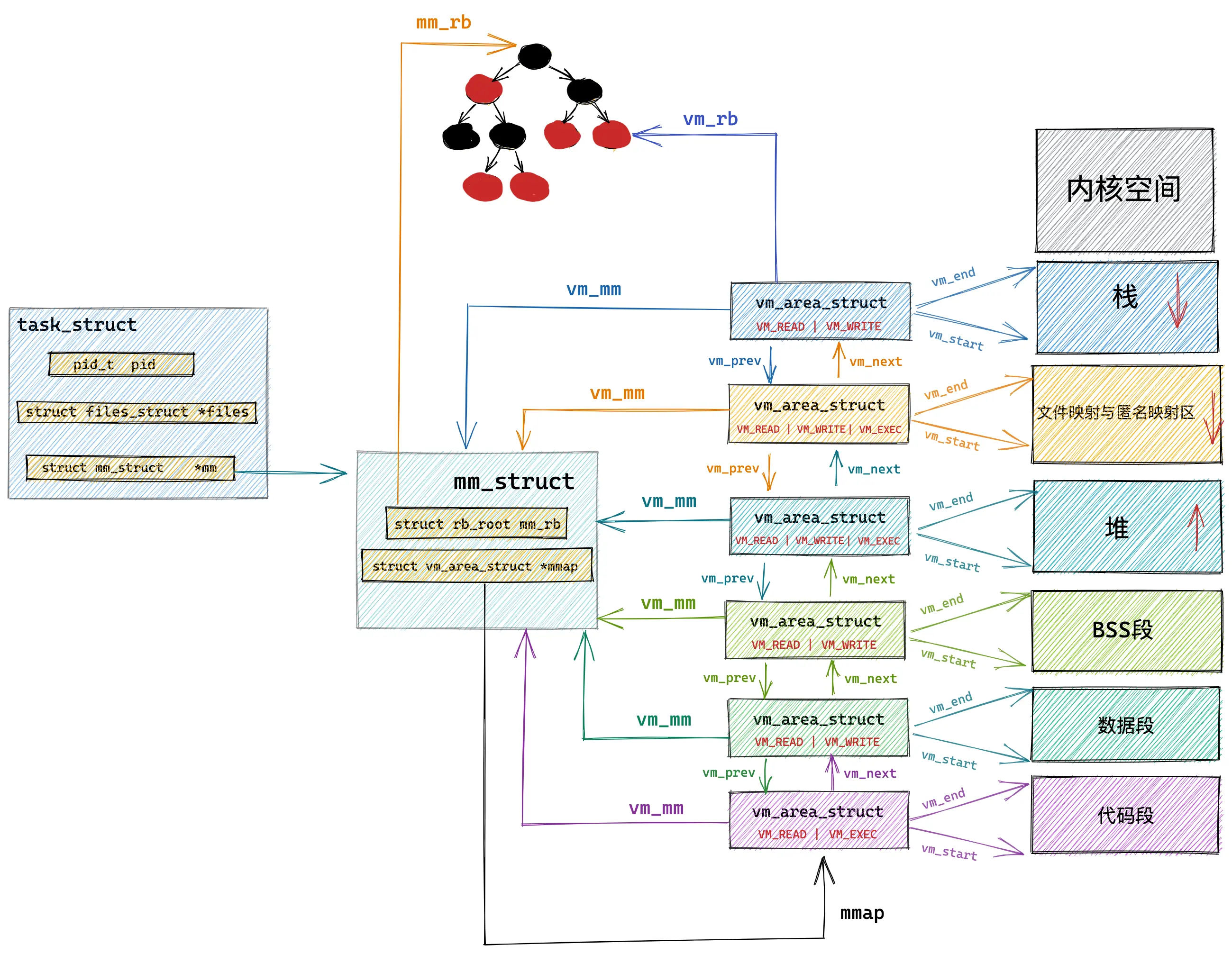
也就是 struct mm_struct 包含了进程在虚拟地址空间的全部信息,每个进程都有唯一的 struct mm_struct 结构体。

1
2
3
4
5
6
7
8
9
10
11
12
13
14
15
16
17
struct mm_struct {
unsigned long task_size; /* size of task vm space */
unsigned long start_code, end_code, start_data, end_data;
unsigned long start_brk, brk, start_stack;
unsigned long arg_start, arg_end, env_start, env_end;
unsigned long mmap_base; /* base of mmap area */
unsigned long total_vm; /* Total pages mapped */
unsigned long locked_vm; /* Pages that have PG_mlocked set */
unsigned long pinned_vm; /* Refcount permanently increased */
unsigned long data_vm; /* VM_WRITE & ~VM_SHARED & ~VM_STACK */
unsigned long exec_vm; /* VM_EXEC & ~VM_WRITE & ~VM_STACK */
unsigned long stack_vm; /* VM_STACK */

struct vm_area_struct *mmap; /* list of VMAs, VMAs 链表的头节点 */
struct rb_root mm_rb; // VMAs 红黑树的根节点
......
}

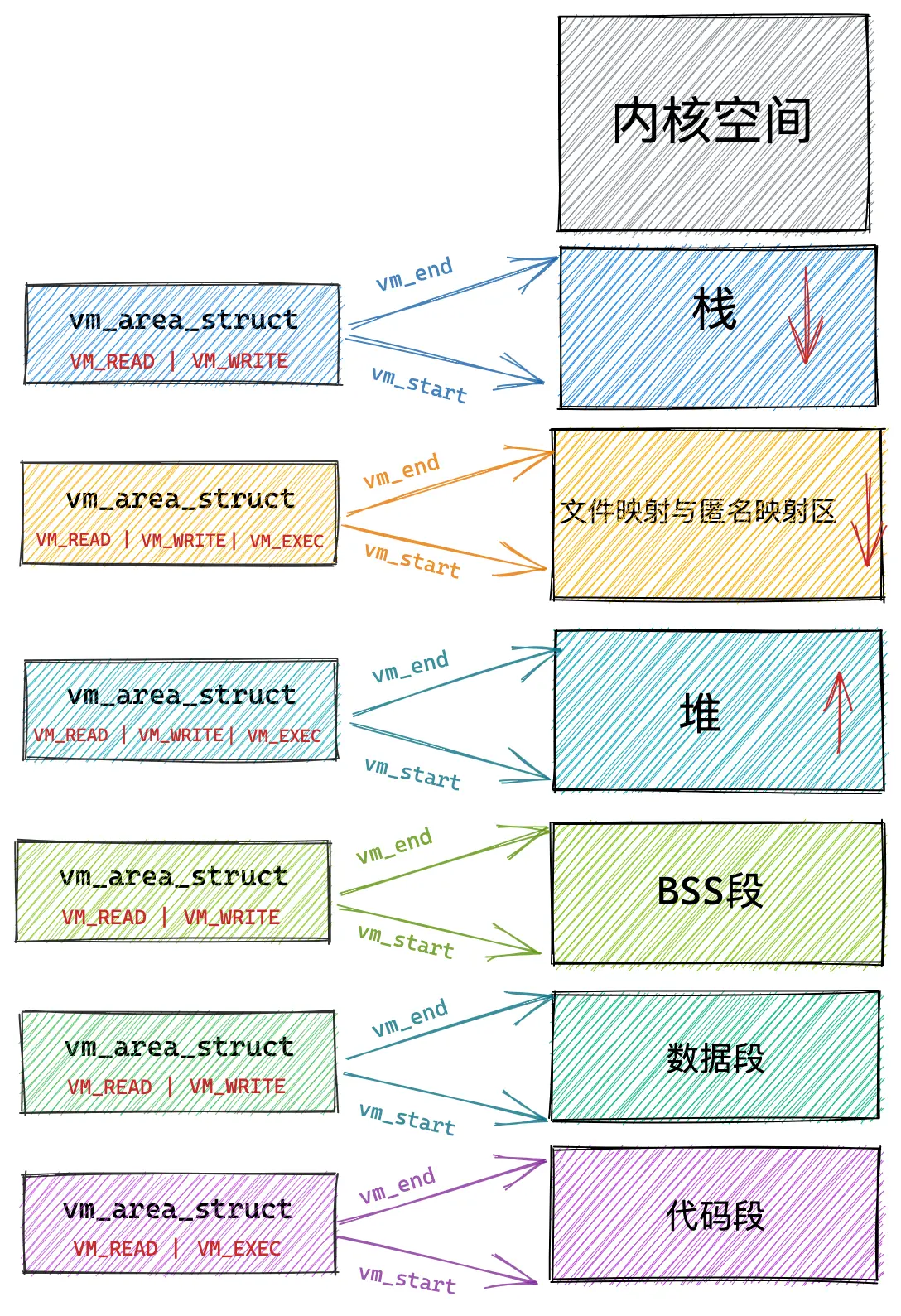
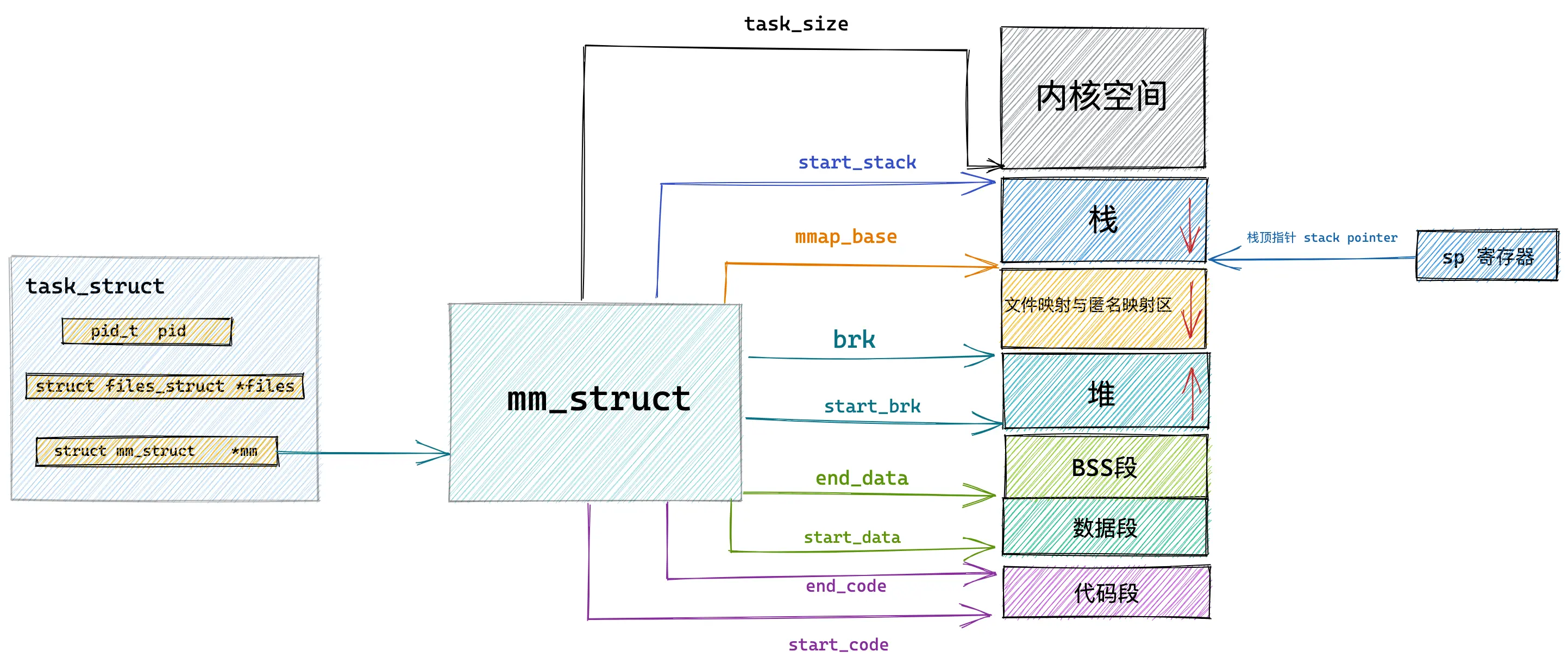
这里拿一下佬的图片。

  • start/end_code: 代码段的空间范围
  • start/end_data: 数据段的空间范围
  • start_brk: 堆的起始地址
  • mmap_base: 内存映射区的起始地址
  • start_stack: 栈的起始地址
  • arg_start/end: 参数列表的位置
  • total_vm: 在进程的虚拟地址空间当中与物理内存映射页面的总数
  • locked_vm: 被锁定不能换出的内存页数
  • data_vm: 数据段中映射的内存页总数

alt text

其中 task_size 定义了用户态地址空间和内核态地址空间的边界。

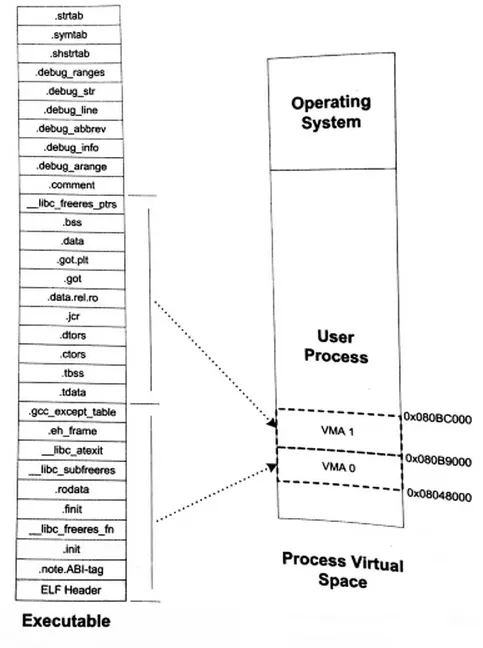
除了 struct mm_struct 用来描述进程的虚拟地址空间之外,我们还需要一个数据结构用来描述该地址空间中各个区域的属性。通常,一个进程只有一个 struct mm_struct,但是有多个 struct vm_area_struct

1
2
3
4
5
6
7
8
9
10
11
12
13
14
15
16
17
18
19
20
21
22
23
24
25
struct vm_area_struct {

unsigned long vm_start; /* Our start address within vm_mm. */
unsigned long vm_end; /* The first byte after our end address
within vm_mm. */

// VMA 区域的具体属性
pgprot_t vm_page_prot;
unsigned long vm_flags;

struct anon_vma *anon_vma; /* Serialized by page_table_lock */
struct file * vm_file; /* File we map to (can be NULL). */
unsigned long vm_pgoff; /* Offset (within vm_file) in PAGE_SIZE
units */
void * vm_private_data; /* was vm_pte (shared mem) */
/* Function pointers to deal with this struct. */
const struct vm_operations_struct *vm_ops;

......
struct vm_area_struct *vm_next, *vm_prev; // 链表
struct rb_node vm_rb; // 红黑树
struct list_head anon_vma_chain;
struct mm_struct *vm_mm;
......
}

图中,我们可以看到不同的区域具有不同的属性,这里我们通过 vm_page_protvm_flags 字段来描述。

vm_flags:

  • VM_READ: 可读
  • VM_WRITE: 可写
  • VM_EXEC: 可执行
  • VM_SHARD: 可多进程之间共享
  • VM_IO: 可映射至设备 IO 空间
  • VM_RESERVED: 内存区域不可被换出
  • VM_SEQ_READ: 内存区域可能被顺序访问。暗示内核可以预读
  • VM_RAND_READ: 内存区域可能被随机访问。暗示内核减少甚至停止预读

alt text

我们还需要进一步观察对 VMA 区域的相关操作。

1
2
3
4
5
6
7
8
9
10
11
12
13
14
15
16
17
18
19
20
21
22
23
24
25
26
27
28
29
30
31
32
33
34
35
36
37
38
39
40
41
42
43
44
45
46
47
48
49
50
51
52
53
54
55
56
57
58
59
60
61
62
63
64
65
66
67
68
69
70
71
72
73
74
75
76
77
78
79
80
81
82
83
84
85
86
87
88
89
90
91
92
93
94
95
96
97
98
99
100
101
102
103
104
105
106
107
// https://elixir.bootlin.com/linux/v7.1-rc7/source/include/linux/mm.h#L768
struct vm_operations_struct {
/**
* @open: Called when a VMA is remapped, split or forked. Not called
* upon first mapping a VMA.
* Context: User context. May sleep. Caller holds mmap_lock.
*/
void (*open)(struct vm_area_struct *vma); // 当虚拟内存被加入到进程的虚拟地址空间的时候会被调用
/**
* @close: Called when the VMA is being removed from the MM.
* Context: User context. May sleep. Caller holds mmap_lock.
*/
void (*close)(struct vm_area_struct *vma); // 当虚拟内存从进程的虚拟地址空间中删除的时候会被调用
/**
* @mapped: Called when the VMA is first mapped in the MM. Not called if
* the new VMA is merged with an adjacent VMA.
*
* The @vm_private_data field is an output field allowing the user to
* modify vma->vm_private_data as necessary.
*
* ONLY valid if set from f_op->mmap_prepare. Will result in an error if
* set from f_op->mmap.
*
* Returns %0 on success, or an error otherwise. On error, the VMA will
* be unmapped.
*
* Context: User context. May sleep. Caller holds mmap_lock.
*/
int (*mapped)(unsigned long start, unsigned long end, pgoff_t pgoff,
const struct file *file, void **vm_private_data);
/* Called any time before splitting to check if it's allowed */
int (*may_split)(struct vm_area_struct *vma, unsigned long addr);
int (*mremap)(struct vm_area_struct *vma);
/*
* Called by mprotect() to make driver-specific permission
* checks before mprotect() is finalised. The VMA must not
* be modified. Returns 0 if mprotect() can proceed.
*/
int (*mprotect)(struct vm_area_struct *vma, unsigned long start,
unsigned long end, unsigned long newflags);
vm_fault_t (*fault)(struct vm_fault *vmf);
vm_fault_t (*huge_fault)(struct vm_fault *vmf, unsigned int order);
vm_fault_t (*map_pages)(struct vm_fault *vmf,
pgoff_t start_pgoff, pgoff_t end_pgoff);
unsigned long (*pagesize)(struct vm_area_struct *vma);

/* notification that a previously read-only page is about to become
* writable, if an error is returned it will cause a SIGBUS */
vm_fault_t (*page_mkwrite)(struct vm_fault *vmf);

/* same as page_mkwrite when using VM_PFNMAP|VM_MIXEDMAP */
vm_fault_t (*pfn_mkwrite)(struct vm_fault *vmf);

/* called by access_process_vm when get_user_pages() fails, typically
* for use by special VMAs. See also generic_access_phys() for a generic
* implementation useful for any iomem mapping.
*/
int (*access)(struct vm_area_struct *vma, unsigned long addr,
void *buf, int len, int write);

/* Called by the /proc/PID/maps code to ask the vma whether it
* has a special name. Returning non-NULL will also cause this
* vma to be dumped unconditionally. */
const char *(*name)(struct vm_area_struct *vma);

#ifdef CONFIG_NUMA
/*
* set_policy() op must add a reference to any non-NULL @new mempolicy
* to hold the policy upon return. Caller should pass NULL @new to
* remove a policy and fall back to surrounding context--i.e. do not
* install a MPOL_DEFAULT policy, nor the task or system default
* mempolicy.
*/
int (*set_policy)(struct vm_area_struct *vma, struct mempolicy *new);

/*
* get_policy() op must add reference [mpol_get()] to any policy at
* (vma,addr) marked as MPOL_SHARED. The shared policy infrastructure
* in mm/mempolicy.c will do this automatically.
* get_policy() must NOT add a ref if the policy at (vma,addr) is not
* marked as MPOL_SHARED. vma policies are protected by the mmap_lock.
* If no [shared/vma] mempolicy exists at the addr, get_policy() op
* must return NULL--i.e., do not "fallback" to task or system default
* policy.
*/
struct mempolicy *(*get_policy)(struct vm_area_struct *vma,
unsigned long addr, pgoff_t *ilx);
#endif
#ifdef CONFIG_FIND_NORMAL_PAGE
/*
* Called by vm_normal_page() for special PTEs in @vma at @addr. This
* allows for returning a "normal" page from vm_normal_page() even
* though the PTE indicates that the "struct page" either does not exist
* or should not be touched: "special".
*
* Do not add new users: this really only works when a "normal" page
* was mapped, but then the PTE got changed to something weird (+
* marked special) that would not make pte_pfn() identify the originally
* inserted page.
*/
struct page *(*find_normal_page)(struct vm_area_struct *vma,
unsigned long addr);
#endif /* CONFIG_FIND_NORMAL_PAGE */
#ifdef CONFIG_USERFAULTFD
const struct vm_uffd_ops *uffd_ops;
#endif
};

下面一个问题是,虚拟内存在内核中是如何被组织起来的呢?可以看到在进程的虚拟地址空间内有两种 vma_area_struct 的组织形式。

  • 双向链表
  • 红黑树

alt text

1.2 用户虚拟地址空间的 API

brk:

通过该函数将堆顶指针向高处移动,从而获得新的内存空间。

mmap:

系统该接口能在文件映射区分配一块内存。

malloc:

如果用户分配的内存小于 128K,则通过 brk 申请内存,否则通过 mmap 申请内存。

这里的 128K 的阈值不一定

1.3 VMA 和 MM 的 demo

C 代码。

1
2
3
4
5
6
7
8
9
10
11
12
13
14
15
16
17
18
19
20
21
22
23
24
25
26
27
28
29
30
31
32
33
34
35
36
37
38
39
40
41
42
43
44
45
46
47
48
49
50
51
52
53
54
55
56
57
58
59
60
61
62
63
64
65
66
67
68
69
70
71
72
73
74
75
76
77
78
79
80
81
82
83
84
85
86
87
88
89
90
91
92
93
94
95
96
#include <linux/init.h>
#include <linux/kernel.h>
#include <linux/mm.h>
#include <linux/mm_types.h>
#include <linux/module.h>
#include <linux/mmap_lock.h>
#include <linux/sched.h>
#include <linux/sched/mm.h>

static void print_vma_flags(struct vm_area_struct *vma, char *buf, size_t len)
{
size_t pos = 0;

if (len < 5)
return;

buf[pos++] = (vma->vm_flags & VM_READ) ? 'r' : '-';
buf[pos++] = (vma->vm_flags & VM_WRITE) ? 'w' : '-';
buf[pos++] = (vma->vm_flags & VM_EXEC) ? 'x' : '-';
buf[pos++] = (vma->vm_flags & VM_SHARED) ? 's' : 'p';
buf[pos] = '\0';
}

static const char *vma_kind(struct vm_area_struct *vma)
{
if (vma->vm_file)
return "file";
if (vma->vm_flags & VM_GROWSDOWN)
return "stack";
if (vma->vm_flags & VM_SHARED)
return "shared-anon";
return "anon";
}

static void dump_current_mm_and_vmas(void)
{
struct mm_struct *mm = current->mm;
struct vm_area_struct *vma;
VMA_ITERATOR(vmi, mm, 0);
unsigned int count = 0;

if (!mm) {
pr_info("mm_vma_demo: current task '%s' pid=%d has no user mm\n",
current->comm, task_pid_nr(current));
return;
}

mmap_read_lock(mm);

pr_info("mm_vma_demo: task=%s pid=%d mm=%px map_count=%d total_vm=%lu pages\n",
current->comm, task_pid_nr(current), mm, mm->map_count, mm->total_vm);
pr_info("mm_vma_demo: code=[0x%lx, 0x%lx) data=[0x%lx, 0x%lx) brk=[0x%lx, 0x%lx) stack_start=0x%lx\n",
mm->start_code, mm->end_code,
mm->start_data, mm->end_data,
mm->start_brk, mm->brk, mm->start_stack);

for_each_vma(vmi, vma) {
char perms[5] = {0};
const char *file_name = "<anonymous>";

print_vma_flags(vma, perms, sizeof(perms));
if (vma->vm_file)
file_name = &vma->vm_file->f_path.dentry->d_name.name[0];

pr_info("mm_vma_demo: vma[%u] [0x%lx, 0x%lx) %s kind=%s pgoff=0x%lx file=%s\n",
count,
vma->vm_start,
vma->vm_end,
perms,
vma_kind(vma),
vma->vm_pgoff,
file_name);
count++;
}

mmap_read_unlock(mm);
}

static int __init mm_vma_demo_init(void)
{
pr_info("mm_vma_demo: init, inspecting current task mm/vmas\n");
dump_current_mm_and_vmas();
return 0;
}

static void __exit mm_vma_demo_exit(void)
{
pr_info("mm_vma_demo: exit\n");
}

module_init(mm_vma_demo_init);
module_exit(mm_vma_demo_exit);

MODULE_LICENSE("GPL");
MODULE_AUTHOR("Jvle");
MODULE_DESCRIPTION("Educational demo for mm_struct and vm_area_struct relationships");

Makefile。

1
2
3
4
5
6
7
8
9
10
KDIR := /lib/modules/$(shell uname -r)/build
PWD := $(shell pwd)

obj-m := mm_vma_demo.o

all:
$(MAKE) -C $(KDIR) M=$(PWD) modules

clean:
$(MAKE) -C $(KDIR) M=$(PWD) clean

观察日志。

1
2
3
4
5
6
7
8
9
10
11
12
13
14
15
16
17
18
19
20
21
22
23
24
25
26
27
28
29
30
31
32
33
34
35
36
37
38
39
40
41
42
[112971.234791] mm_vma_demo: init, inspecting current task mm/vmas
[112971.234802] mm_vma_demo: task=insmod pid=43779 mm=ffff8b3608e19b80 map_count=39 total_vm=2244 pages
[112971.234813] mm_vma_demo: code=[0x5f62ece6a000, 0x5f62ece86185) data=[0x5f62ece8f9f0, 0x5f62ece91020) brk=[0x5f62fcf6b000, 0x5f62fcf8c000) stack_start=0x7ffe7d098ba0
[112971.234823] mm_vma_demo: vma[0] [0x5f62ece66000, 0x5f62ece6a000) r--p kind=file pgoff=0x0 file=kmod
[112971.234831] mm_vma_demo: vma[1] [0x5f62ece6a000, 0x5f62ece87000) r-xp kind=file pgoff=0x4 file=kmod
[112971.234837] mm_vma_demo: vma[2] [0x5f62ece87000, 0x5f62ece8f000) r--p kind=file pgoff=0x21 file=kmod
[112971.234843] mm_vma_demo: vma[3] [0x5f62ece8f000, 0x5f62ece91000) r--p kind=file pgoff=0x28 file=kmod
[112971.234848] mm_vma_demo: vma[4] [0x5f62ece91000, 0x5f62ece92000) rw-p kind=file pgoff=0x2a file=kmod
[112971.234852] mm_vma_demo: vma[5] [0x5f62fcf6b000, 0x5f62fcf8c000) rw-p kind=anon pgoff=0x5f62fcf6b file=<anonymous>
[112971.234858] mm_vma_demo: vma[6] [0x706e30800000, 0x706e30828000) r--p kind=file pgoff=0x0 file=libc.so.6
[112971.234863] mm_vma_demo: vma[7] [0x706e30828000, 0x706e309b0000) r-xp kind=file pgoff=0x28 file=libc.so.6
[112971.234868] mm_vma_demo: vma[8] [0x706e309b0000, 0x706e309ff000) r--p kind=file pgoff=0x1b0 file=libc.so.6
[112971.234874] mm_vma_demo: vma[9] [0x706e309ff000, 0x706e30a03000) r--p kind=file pgoff=0x1fe file=libc.so.6
[112971.234878] mm_vma_demo: vma[10] [0x706e30a03000, 0x706e30a05000) rw-p kind=file pgoff=0x202 file=libc.so.6
[112971.234884] mm_vma_demo: vma[11] [0x706e30a05000, 0x706e30a12000) rw-p kind=anon pgoff=0x706e30a05 file=<anonymous>
[112971.234890] mm_vma_demo: vma[12] [0x706e30c00000, 0x706e30cb3000) r--p kind=file pgoff=0x0 file=libcrypto.so.3
[112971.234896] mm_vma_demo: vma[13] [0x706e30cb3000, 0x706e30fe7000) r-xp kind=file pgoff=0xb3 file=libcrypto.so.3
[112971.234901] mm_vma_demo: vma[14] [0x706e30fe7000, 0x706e310b2000) r--p kind=file pgoff=0x3e7 file=libcrypto.so.3
[112971.234906] mm_vma_demo: vma[15] [0x706e310b2000, 0x706e3110e000) r--p kind=file pgoff=0x4b1 file=libcrypto.so.3
[112971.234911] mm_vma_demo: vma[16] [0x706e3110e000, 0x706e31111000) rw-p kind=file pgoff=0x50d file=libcrypto.so.3
[112971.234916] mm_vma_demo: vma[17] [0x706e31111000, 0x706e31114000) rw-p kind=anon pgoff=0x706e31111 file=<anonymous>
[112971.234921] mm_vma_demo: vma[18] [0x706e3120f000, 0x706e31211000) rw-p kind=anon pgoff=0x706e3120f file=<anonymous>
[112971.234926] mm_vma_demo: vma[19] [0x706e31211000, 0x706e31214000) r--p kind=file pgoff=0x0 file=liblzma.so.5.4.5
[112971.234931] mm_vma_demo: vma[20] [0x706e31214000, 0x706e31236000) r-xp kind=file pgoff=0x3 file=liblzma.so.5.4.5
[112971.234936] mm_vma_demo: vma[21] [0x706e31236000, 0x706e31241000) r--p kind=file pgoff=0x25 file=liblzma.so.5.4.5
[112971.234941] mm_vma_demo: vma[22] [0x706e31241000, 0x706e31242000) r--p kind=file pgoff=0x30 file=liblzma.so.5.4.5
[112971.234946] mm_vma_demo: vma[23] [0x706e31242000, 0x706e31243000) rw-p kind=file pgoff=0x31 file=liblzma.so.5.4.5
[112971.234951] mm_vma_demo: vma[24] [0x706e31243000, 0x706e31247000) r--p kind=file pgoff=0x0 file=libzstd.so.1.5.5
[112971.234957] mm_vma_demo: vma[25] [0x706e31247000, 0x706e312ee000) r-xp kind=file pgoff=0x4 file=libzstd.so.1.5.5
[112971.234962] mm_vma_demo: vma[26] [0x706e312ee000, 0x706e312fb000) r--p kind=file pgoff=0xab file=libzstd.so.1.5.5
[112971.234967] mm_vma_demo: vma[27] [0x706e312fb000, 0x706e312fc000) r--p kind=file pgoff=0xb7 file=libzstd.so.1.5.5
[112971.234972] mm_vma_demo: vma[28] [0x706e312fc000, 0x706e312fd000) rw-p kind=file pgoff=0xb8 file=libzstd.so.1.5.5
[112971.234977] mm_vma_demo: vma[29] [0x706e3131c000, 0x706e3131e000) rw-p kind=anon pgoff=0x706e3131c file=<anonymous>
[112971.234982] mm_vma_demo: vma[30] [0x706e3131e000, 0x706e31320000) r--p kind=anon pgoff=0x0 file=<anonymous>
[112971.234987] mm_vma_demo: vma[31] [0x706e31320000, 0x706e31322000) r--p kind=anon pgoff=0x0 file=<anonymous>
[112971.234992] mm_vma_demo: vma[32] [0x706e31322000, 0x706e31324000) r-xp kind=anon pgoff=0x0 file=<anonymous>
[112971.234997] mm_vma_demo: vma[33] [0x706e31324000, 0x706e31325000) r--p kind=file pgoff=0x0 file=ld-linux-x86-64.so.2
[112971.235002] mm_vma_demo: vma[34] [0x706e31325000, 0x706e31350000) r-xp kind=file pgoff=0x1 file=ld-linux-x86-64.so.2
[112971.235007] mm_vma_demo: vma[35] [0x706e31350000, 0x706e3135a000) r--p kind=file pgoff=0x2c file=ld-linux-x86-64.so.2
[112971.235012] mm_vma_demo: vma[36] [0x706e3135a000, 0x706e3135c000) r--p kind=file pgoff=0x36 file=ld-linux-x86-64.so.2
[112971.235017] mm_vma_demo: vma[37] [0x706e3135c000, 0x706e3135e000) rw-p kind=file pgoff=0x38 file=ld-linux-x86-64.so.2
[112971.235022] mm_vma_demo: vma[38] [0x7ffe7d079000, 0x7ffe7d09a000) rw-p kind=stack pgoff=0x7ffffffde file=<anonymous>

2 内核的虚拟地址空间

不同进程之间的虚拟地址空间是相互隔离的,但是内核的虚拟地址空间却是所有进程共享的,不同的进程进入到内核之后看到的虚拟地址空间是一样的。

2.1 32 位系统的内核的虚拟地址空间布局

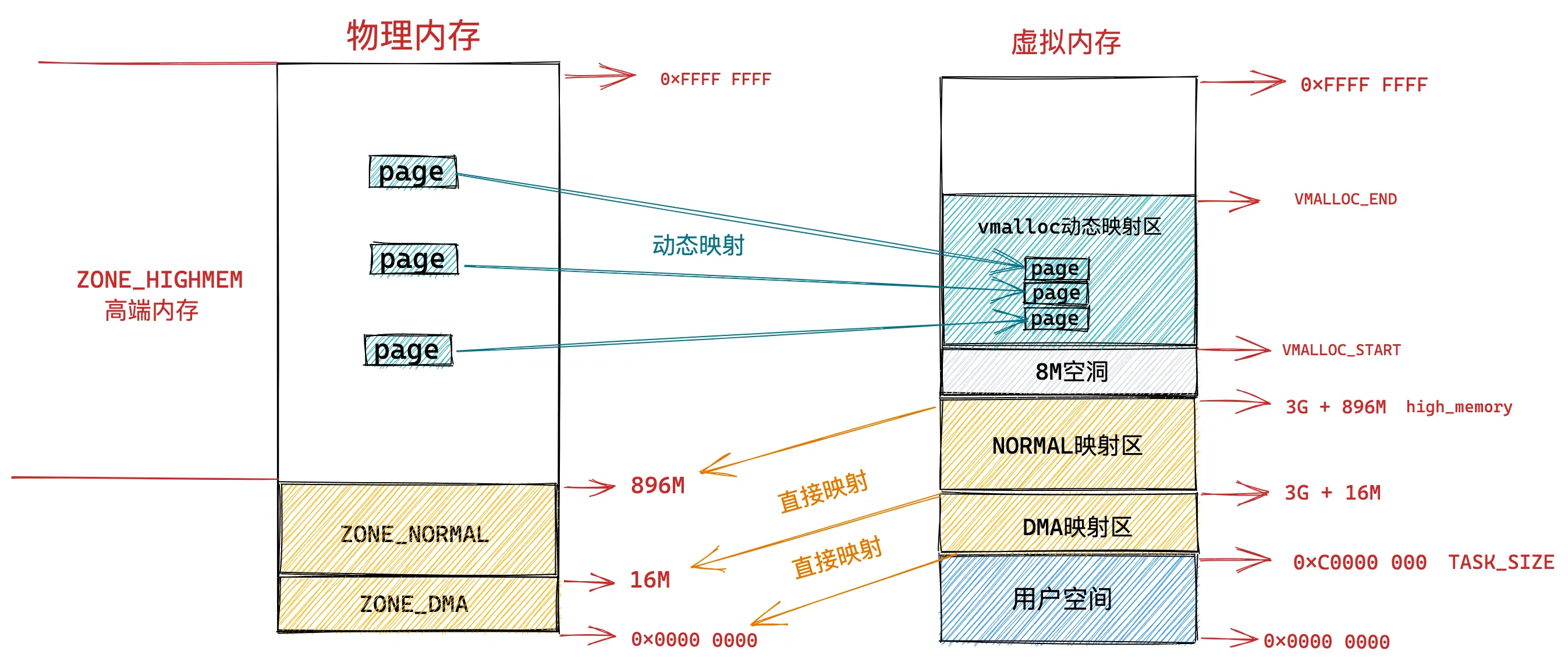
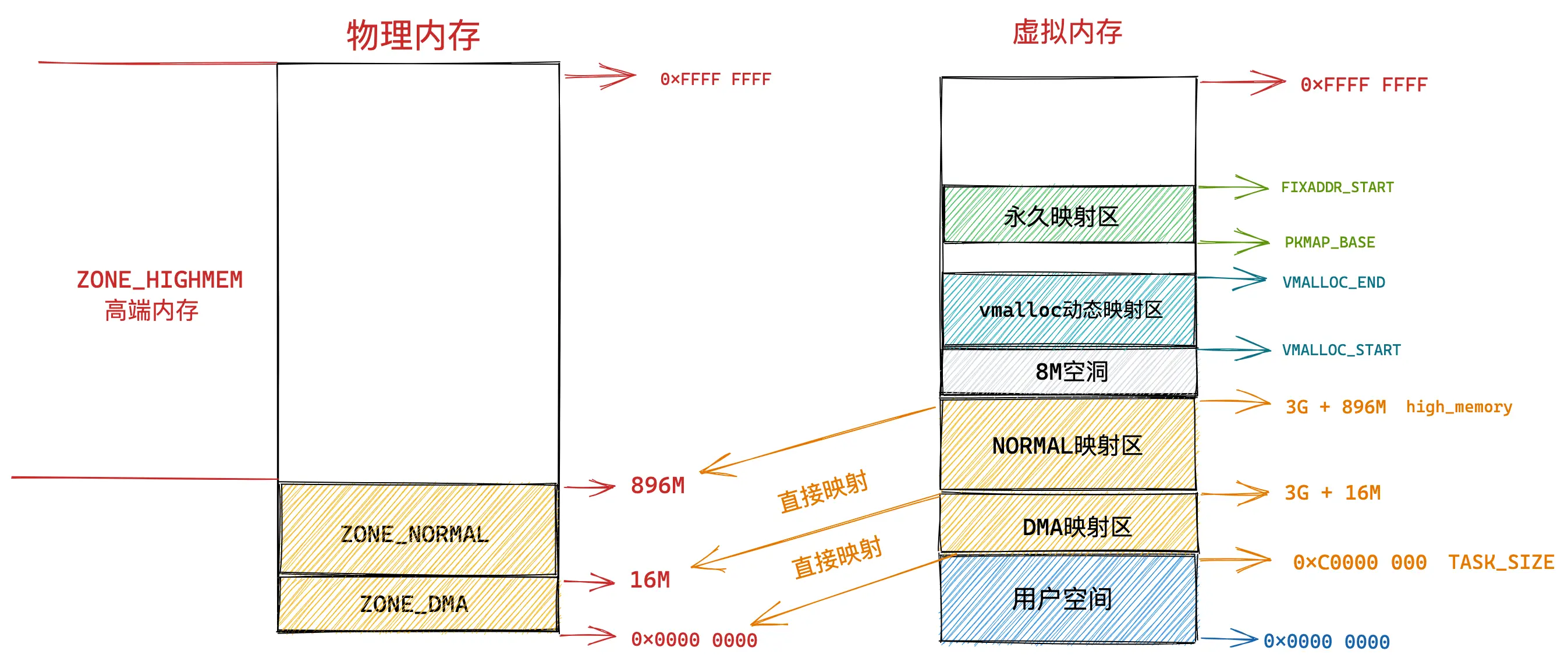
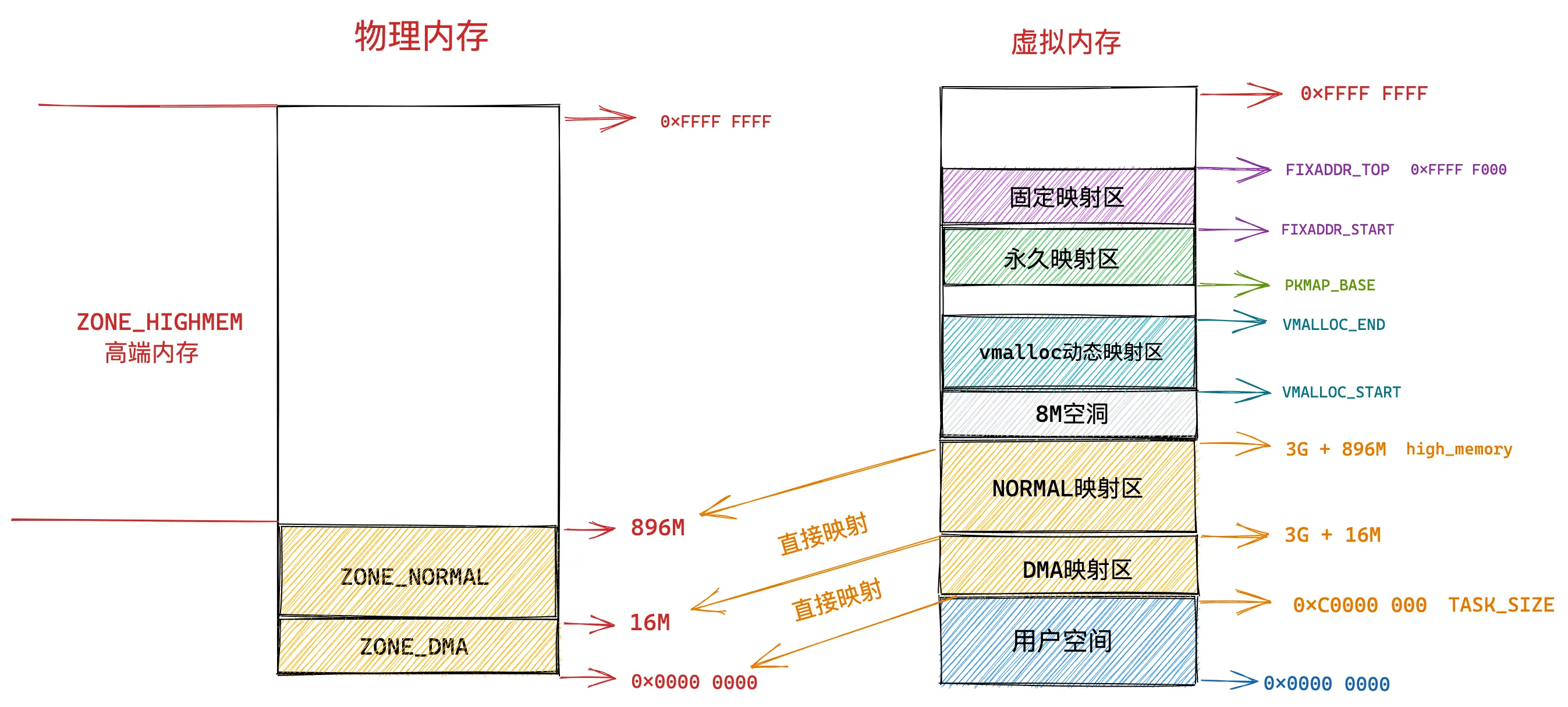
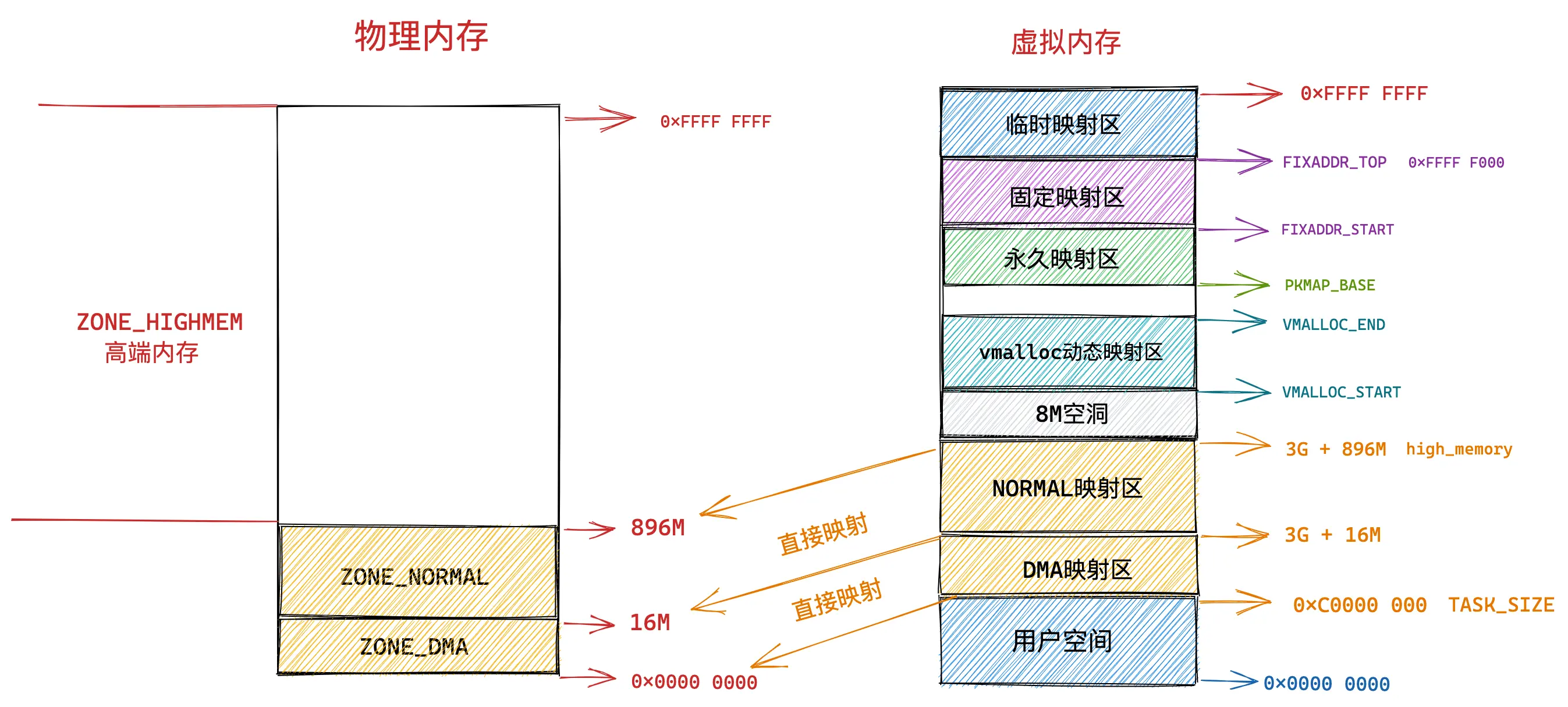
32 位的系统的内核虚拟地址空间只有 1GB 的大小,范围为: 0xC000 000 - 0xFFFF FFFF,由于这个范围太小了,需要进一步精细化管理,因此出现了很多区域。

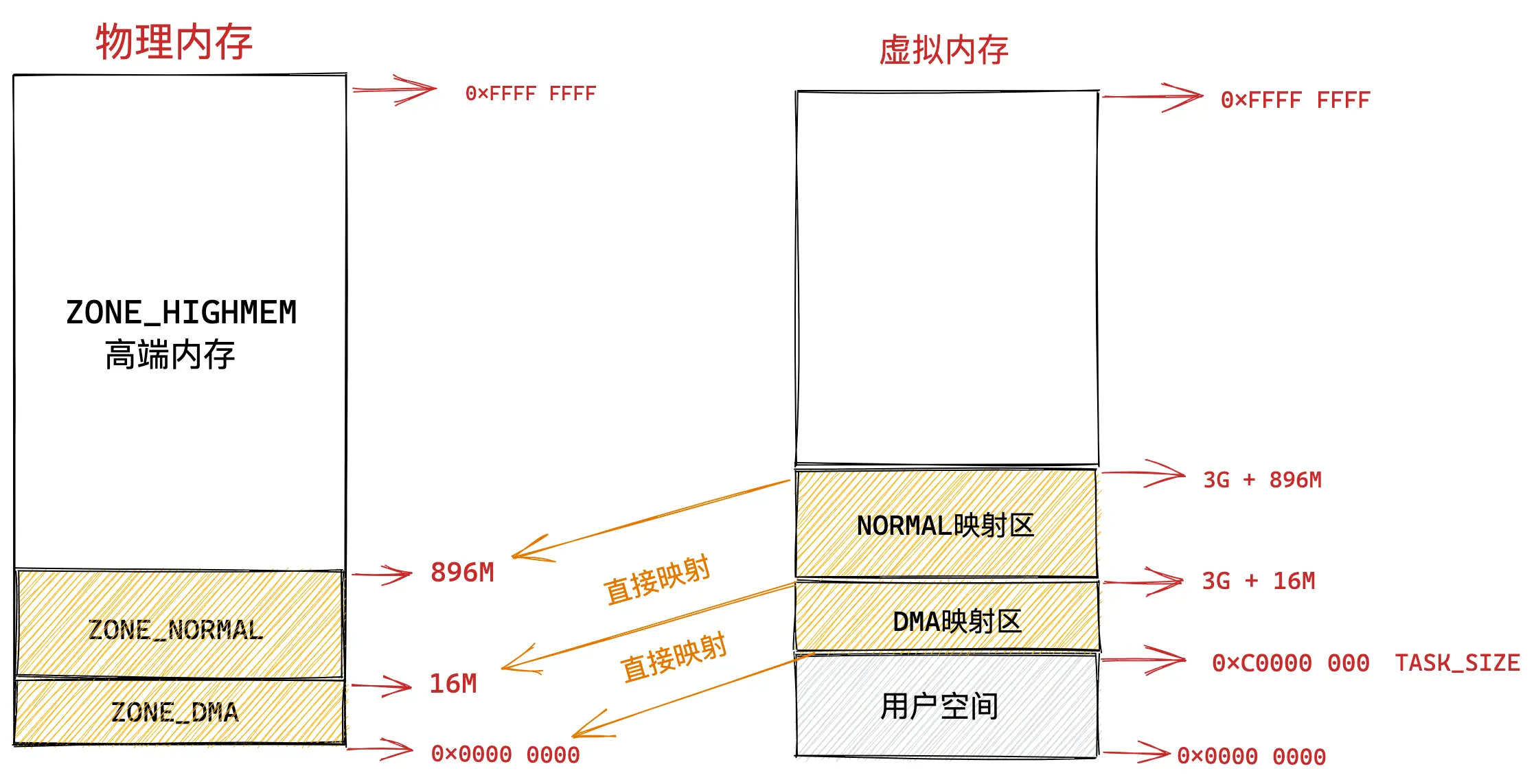
  • 直接映射区

    • 内核的虚拟地址空间当中有一块区域是直接映射区,这一块儿区域的地址范围是 3G - 3G + 896M,会直接映射到物理内存的 0 - 896M,因此才得以叫直接映射区。
      alt text
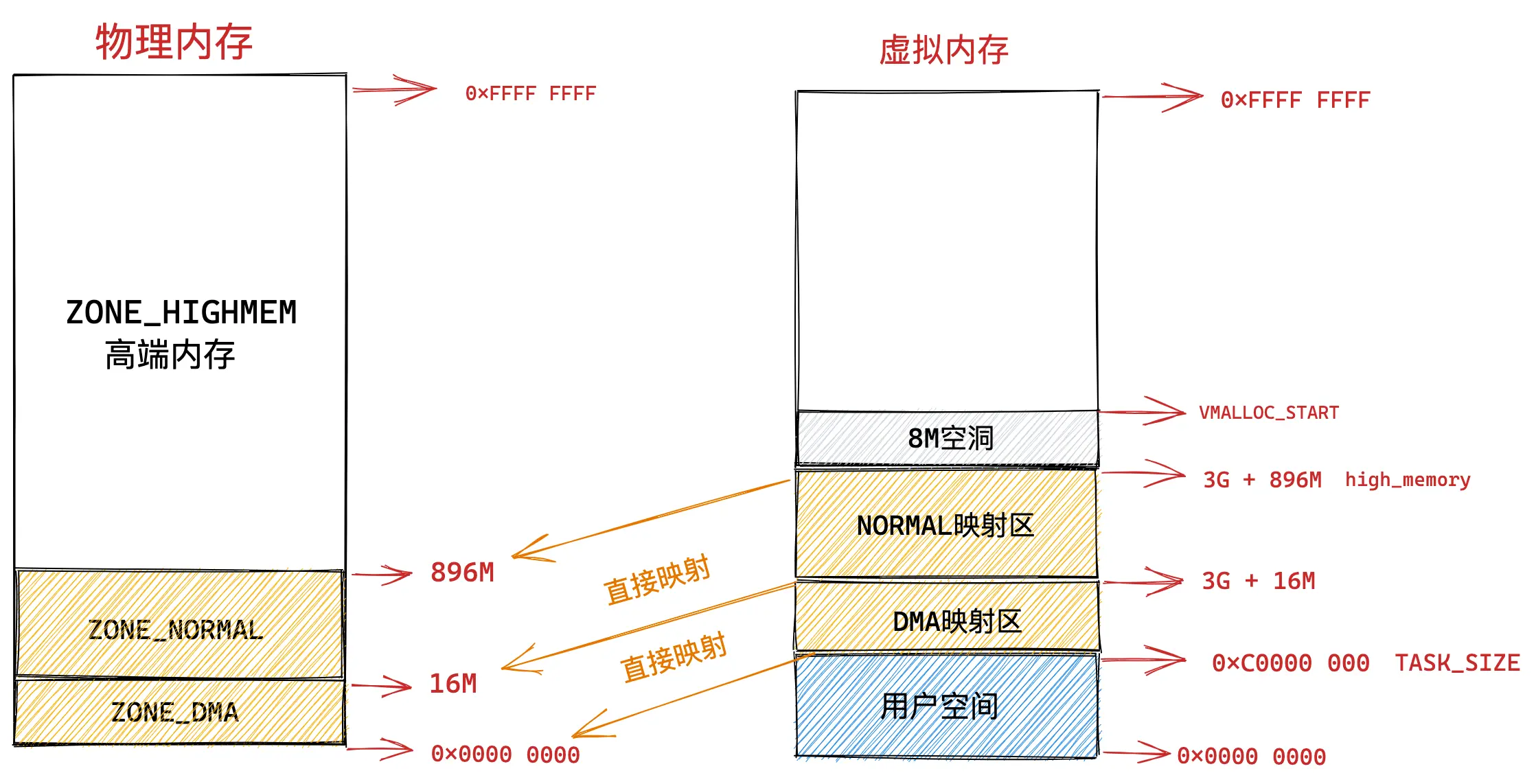
  • 高端内存(ZONE_HIGHMEM)

    • 896M 以上的内存被称为高端内存区,在 32 位的情况下,在虚拟内存当中,用户空间占用了 3G,直接映射区也占了 896M,这么算来内核剩余可用的虚拟内存空间只有 128MM。而物理内存当中的高端内存区域还有 3200M(假设内存是4G)。其中 3G + 896M 称为 high_memory,还有 8M 的虚拟地址空间,地址为 VMALLOC_START,high_memory 到 VMALLOC_START 的空间存在一个内存空洞。
      alt text
  • 动态映射区

    • 从进程虚拟地址空间的 VMALLOC_STARTVMALLOC_END 之间的区域称为动态映射区,该区域通过动态映射的方式来获取内核物理内存当中的高端内存。该处的内存是通过 vmalloc 的接口获取的,我们也同时知道,vmalloc 获取的内存在虚拟地址空间是连续的,但是在物理地址空间是不连续的。
      alt text
  • 永久映射区

    • PKMAP_BASEFIXADDR_START 之间称为永久映射区,这段区域允许虚拟地址空间和物理内存之间建立长期有效的关系。通过 alloc_pages 接口在高端内存当中申请到的物理内存页可以通过调用 kmap 映射到永久映射区当中去。
      alt text
  • 固定映射区

    • FIXADDR_STARTFIXADDR_TOP 为固定映射区。该区域内的虚拟地址是固定的,而映射的物理地址是可以改变的。
      alt text
  • 临时映射区

    • 该区域是用来短期映射的。
      alt text

2.2 64 位系统的内核的虚拟地址空间布局

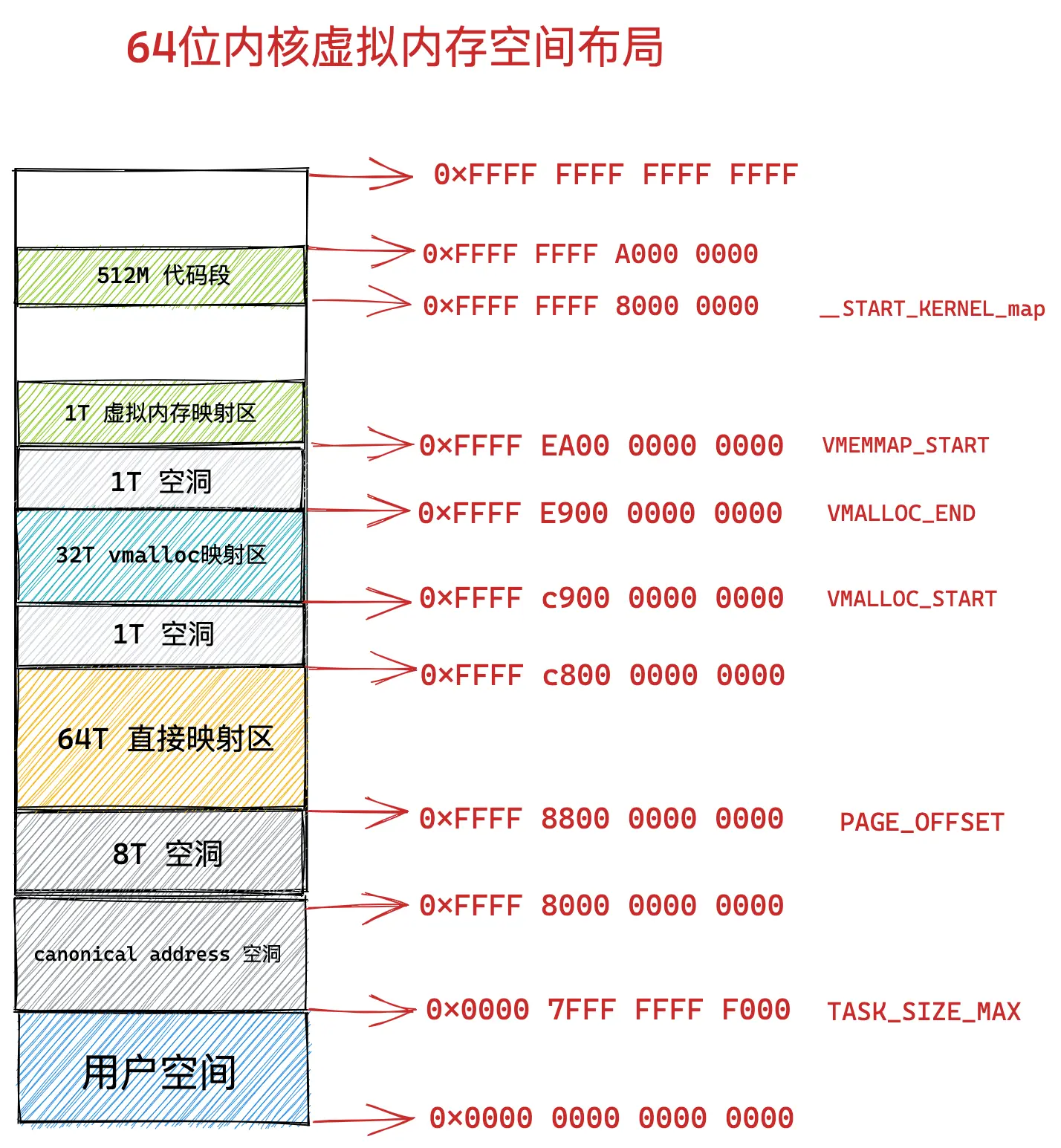
64位的系统的虚拟地址空间最高可达 128T,想要对物理内存进行映射就非常简单,不需要划分出那么多复杂的区域了。

  • 直接映射区

    • 该区域同 32 位系统,该区域的虚拟地址空间减去对应的 PAGE_OFFSET 就能得到物理内存地址。
  • 动态映射区

    • 内核在此处使用 vmalloc 进行内存的申请。
  • 虚拟内存映射区

    • VMEMMAP_START 开始 1T 的空间是虚拟内存映射区,用于存放 struct page 结构。
  • 512M 代码段

    • 用于存放内核代码段,全局变量,BSS 等内容。

alt text

可以通过 sudo cat /proc/iomem 查看物理内存的分布情况

3 程序的加载

一个有趣的现象是,当我们写好了一个 hello.c 程序,最后把它编译成为可执行文件 hello,运行程序的时候会发生什么呢?

1
2
$ ./hello
hello world!

此时我们是在 shell 中运行的,shell 作为一个进程就会 fork 一个新的进程,之后通过 execve 将该 ELF 文件执行起来。

https://elixir.bootlin.com/linux/v7.1-rc7/source/fs/exec.c#L1924

1
execve->系统调用->do_execveat_common->bprm_execve->exec_binprm->search_binary_handler->load_binary(load_elf_binary)

load_elf_binray 为止,前面都是准备工作。

1
2
3
4
5
6
7
8
9
10
11
12
13
14
15
16
17
18
19
20
21
22
23
24
25
26
27
28
29
30
31
32
33
34
35
36
37
38
39
40
41
42
43
44
45
46
47
48
49
50
51
52
53
54
55
56
57
58
59
60
61
62
63
64
65
66
67
68
69
70
71
72
73
74
75
76
77
78
79
80
81
82
83
84
85
86
87
88
89
90
91
92
93
94
95
96
97
98
99
100
101
102
103
104
// https://elixir.bootlin.com/linux/v7.1-rc7/source/fs/binfmt_elf.c#L832
static int load_elf_binary(struct linux_binprm *bprm)
{
// ......
// 读取程序的 Program Header Table
elf_phdata = load_elf_phdrs(elf_ex, bprm->file);
if (!elf_phdata)
goto out;

// 开始加载 segments
elf_ppnt = elf_phdata;
for (i = 0; i < elf_ex->e_phnum; i++, elf_ppnt++) {
char *elf_interpreter;

if (elf_ppnt->p_type == PT_GNU_PROPERTY) {
elf_property_phdata = elf_ppnt;
continue;
}

if (elf_ppnt->p_type != PT_INTERP)
continue;

/*
* This is the program interpreter used for shared libraries -
* for now assume that this is an a.out format binary.
*/
retval = -ENOEXEC;
if (elf_ppnt->p_filesz > PATH_MAX || elf_ppnt->p_filesz < 2)
goto out_free_ph;
retval = -ENOMEM;
elf_interpreter = kmalloc(elf_ppnt->p_filesz, GFP_KERNEL);
if (!elf_interpreter)
goto out_free_ph;

retval = elf_read(bprm->file, elf_interpreter, elf_ppnt->p_filesz,
elf_ppnt->p_offset);
if (retval < 0)
goto out_free_interp;
/* make sure path is NULL terminated */
retval = -ENOEXEC;
if (elf_interpreter[elf_ppnt->p_filesz - 1] != '\0')
goto out_free_interp;

interpreter = open_exec(elf_interpreter);
kfree(elf_interpreter);
retval = PTR_ERR(interpreter);
if (IS_ERR(interpreter))
goto out_free_ph;

/*
* If the binary is not readable then enforce mm->dumpable = 0
* regardless of the interpreter's permissions.
*/
would_dump(bprm, interpreter);

interp_elf_ex = kmalloc_obj(*interp_elf_ex);
if (!interp_elf_ex) {
retval = -ENOMEM;
goto out_free_file;
}

/* Get the exec headers */
retval = elf_read(interpreter, interp_elf_ex,
sizeof(*interp_elf_ex), 0);
if (retval < 0)
goto out_free_dentry;

break;

out_free_interp:
kfree(elf_interpreter);
goto out_free_ph;
}

// ......

e_entry = elf_ex->e_entry + load_bias;
phdr_addr += load_bias;
elf_brk += load_bias;
start_code += load_bias;
end_code += load_bias;
start_data += load_bias;
end_data += load_bias;

// ......

// 这里可以看到会设置该 ELF 关于进程和内存的一些属性
mm = current->mm;
mm->end_code = end_code;
mm->start_code = start_code;
mm->start_data = start_data;
mm->end_data = end_data;
mm->start_stack = bprm->p;

elf_coredump_set_mm_eflags(mm, elf_ex->e_flags);

// ......

// 程序到这里已经加载完毕了,可以直接开始执行了。
START_THREAD(elf_ex, regs, elf_entry, bprm->p);

// ......
}

以上全部的流程总结来说就是创建一个新的进程,将一个 ELF 文件的各个 segments 解析完毕,之后将解析的内容按照虚拟地址空间的规范加载到进程的虚拟地址空间当中去,此时就可以等待执行了。

alt text

References

  1. 对虚拟内存的一篇 blog: https://ignorantshr.github.io/person-blog/interview/%E6%93%8D%E4%BD%9C%E7%B3%BB%E7%BB%9F/%E5%86%85%E5%AD%98%E7%AE%A1%E7%90%86/05.%20%E6%B7%B1%E5%85%A5%E7%90%86%E8%A7%A3%20Linux%20%E8%99%9A%E6%8B%9F%E5%86%85%E5%AD%98%E7%AE%A1%E7%90%86/#121

  2. 貌似更全面的 blog: https://www.cnblogs.com/binlovetech/p/16824522.html