CrackMe lab1
解题工具:
- IDA Pro 9.4 (静态分析工具)
- Ilspy (方便查看 C#)
- wine (Linux 环境执行 Windows 程序的一个软件)
解题插件
解题代码格式:
题目链接
1 start from here
这是我第一次尝试开始解决逆向题目, 在网站中找了一个 crackme, 这次题目的程序没有壳, 因此不需要任何脱壳的工作,
对于 .NET 格式的程序我不是很清楚, 当然这也是作为一次学习, 于是我便开始了尝试, 另外值得一提的是, 这也是我第一次使用 IDA.
另外我转上了 IDA 的一个 MCP, ida-pro-mcp, 这也是我在 AI 时代下的一次尝试和思考.
我们通过 wine 打开程序会发现截图如下.
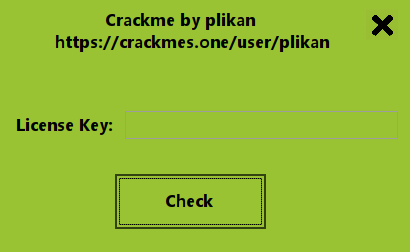
当我们输入密码并点击 Check 按钮之后, 验证正确即解码成功.
通过 IDA 打开这个二进制文件, 我们可以看到反汇编的代码.
1
2
3
4
5
6
7
8
9
10
11
12
13
14
15
16
17
18
19
20
21
22
23
24
25
| .namespace WindowsFormsApp8
{
.class private auto abstract sealed ansi beforefieldinit Program extends [mscorlib]System.Object
{
.method private static hidebysig void Main()
{
.entrypoint
.maxstack 8
.custom instance void [mscorlib]System.STAThreadAttribute::.ctor() = (
01 00 00 00) // ....
nop
call void [System.Windows.Forms]System.Windows.Forms.Application::EnableVisualStyles()
nop
ldc.i4.0
call void [System.Windows.Forms]System.Windows.Forms.Application::SetCompatibleTextRenderingDefault(bool)
nop
newobj instance void WindowsFormsApp8.Form1::.ctor()
call void [System.Windows.Forms]System.Windows.Forms.Application::Run(class [System.Windows.Forms]System.Windows.Forms.Form)
nop
ret
}
}
}
|
最初, 我看到这一堆代码是非常蒙圈的, 查询一遍后发现, 这就是 IL, 更准确来说我的理解是类似 IR 这种高级语言到机器码的中间
表示, 只不过这个过程是 C# 专属的, 那我也就不去过分追究了, 看到了什么就学习什么, 我的学习成果如下.
另外, 为什么我确定这里就是函数的入口, 主要是因为这个 Main 和 .entrypoint.
1.2 IL 常见指令格式
2.1 方法类
- .method 定义一个方法
- .entrypoint 标记程序入口, 通常是 Main
- .maxstack 2 方法最多需要 2 个栈槽
- .locals init (…) 定义并初始化局部变量
- .custom 添加方法或类的属性
- .try 开始异常保护区域
- finally 无论是否异常都执行
- catch 捕获异常
2.2 其他类
这里只书写碰到的觉得有意义的, 指令很多根本记忆不完.
- call, 调用方法
- ret, 返回
- brtrue, 条件为真跳转
- brfalse, 条件为假跳转
- ldarg, 读取函数参数
- ldloc, 读取局部变量
- stloc, 写入局部变量
- ldfld, 读取对象字段
- stfld, 写入对象字段
- ldstr, 加载字符串常量
- newobj, 创建对象
- callvirt, 调用实例方法
- ldloca, 传递变量地址, 常用于 out 或 ref
- ldelem, 读取数组元素
- stelem, 写入数组元素
继续.
通过分析(自己也好, AI 也罢, 这里直接用 AI 分析就够了), 我们可以看到除了 newobj 这个操作, 其他的代码都在进行 Windows
窗口的相关绘制, 那么我们这里主要就要找到污点, 那必定在这一句.
继续朝里面跟踪.
1
2
3
4
5
6
7
8
9
10
11
12
13
14
15
16
17
18
19
20
21
22
23
24
25
26
27
28
29
30
31
32
33
34
35
36
37
38
39
| .method public hidebysig specialname rtspecialname instance void .ctor()
// CODE XREF: WindowsFormsApp8.Program__Main+E↓p
{
.maxstack 3
ldarg.0
call string WindowsFormsApp8.a4gy7awe4g7hauruj::GenerateKey()
stfld string WindowsFormsApp8.Form1::XYI
ldarg.0
ldnull
stfld class [System]System.ComponentModel.IContainer WindowsFormsApp8.Form1::components
ldarg.0
call instance void [System.Windows.Forms]System.Windows.Forms.Form::.ctor()
nop
nop
ldarg.0
call instance void WindowsFormsApp8.Form1::InitializeComponent()
nop
ldarg.0
ldarg.0
ldftn instance void WindowsFormsApp8.Form1::Form1_MouseDown(object sender, class [System.Windows.Forms]System.Windows.Forms.MouseEventArgs e)
newobj instance void [System.Windows.Forms]System.Windows.Forms.MouseEventHandler::.ctor(object, native int)
call instance void [System.Windows.Forms]System.Windows.Forms.Control::add_MouseDown(class [System.Windows.Forms]System.Windows.Forms.MouseEventHandler)
nop
ldarg.0
ldfld class [System.Windows.Forms]System.Windows.Forms.Label WindowsFormsApp8.Form1::label1
ldarg.0
ldftn instance void WindowsFormsApp8.Form1::Form1_MouseDown(object sender, class [System.Windows.Forms]System.Windows.Forms.MouseEventArgs e)
newobj instance void [System.Windows.Forms]System.Windows.Forms.MouseEventHandler::.ctor(object, native int)
callvirt instance void [System.Windows.Forms]System.Windows.Forms.Control::add_MouseDown(class [System.Windows.Forms]System.Windows.Forms.MouseEventHandler)
nop
ldarg.0
ldfld class [System.Windows.Forms]System.Windows.Forms.Label WindowsFormsApp8.Form1::label2
ldarg.0
ldftn instance void WindowsFormsApp8.Form1::Form1_MouseDown(object sender, class [System.Windows.Forms]System.Windows.Forms.MouseEventArgs e)
newobj instance void [System.Windows.Forms]System.Windows.Forms.MouseEventHandler::.ctor(object, native int)
callvirt instance void [System.Windows.Forms]System.Windows.Forms.Control::add_MouseDown(class [System.Windows.Forms]System.Windows.Forms.MouseEventHandler)
nop
ret
}
|
我们看到了可疑点, 函数中调用了一个 GenerateKey. 并且我们将数据通过 stfld 写入了 XYI.
后续的代码貌似都是对窗口的初始化, 这里就不再关心. 因此这里产生怀疑, 这个 XYI 就是我们
最后的密码, 通过 GenerateKey 获取密码.
在程序执行的过程当中, 我们点击 Check 按钮之后将会触发代码的审查, 并且错误的时候呢会打印
文本.
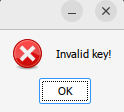
这里我们直接在 IDA 当中检索关键词 valid 即可看到触发判断的那层代码.
1
2
3
4
5
6
7
8
9
10
11
12
13
14
15
16
17
18
19
20
21
22
23
24
25
26
27
28
29
30
31
32
33
34
35
36
37
38
39
40
41
42
43
44
45
46
| .method private hidebysig instance void button1_Click(object sender, class [mscorlib]System.EventArgs e)
// DATA XREF: WindowsFormsApp8.Form1__InitializeComponent+1B7↓r
{
.maxstack 4
.locals init (string V0,
bool V1)
nop
ldarg.0
ldfld class [System.Windows.Forms]System.Windows.Forms.TextBox WindowsFormsApp8.Form1::textBox1
callvirt instance string [System.Windows.Forms]System.Windows.Forms.Control::get_Text()
ldstr asc_1064 // " "
ldstr asc_1068 // ""
callvirt instance string [mscorlib]System.String::Replace(string, string)
callvirt instance string [mscorlib]System.String::Trim()
stloc.0
ldloc.0
ldarg.0
ldfld string WindowsFormsApp8.Form1::XYI
ldc.i4.5
call bool [mscorlib]System.String::Equals(string, string, valuetype [mscorlib]System.StringComparison)
stloc.1
ldloc.1
brfalse.s loc_3C9
nop
ldstr aKeyValidAccess // "Key valid! Access granted."
ldstr asc_1068 // ""
ldc.i4.0
ldc.i4.s 0x40
call valuetype [System.Windows.Forms]System.Windows.Forms.DialogResult [System.Windows.Forms]System.Windows.Forms.MessageBox::Show(string, string, valuetype [System.Windows.Forms]System.Windows.Forms.MessageBoxButtons, valuetype [System.Windows.Forms]System.Windows.Forms.MessageBoxIcon)
pop
nop
br.s loc_3DE
loc_3C9: // CODE XREF: WindowsFormsApp8.Form1__button1_Click+30↑j
nop
ldstr aInvalidKey // "Invalid key!"
ldstr asc_1068 // ""
ldc.i4.0
ldc.i4.s 0x10
call valuetype [System.Windows.Forms]System.Windows.Forms.DialogResult [System.Windows.Forms]System.Windows.Forms.MessageBox::Show(string, string, valuetype [System.Windows.Forms]System.Windows.Forms.MessageBoxButtons, valuetype [System.Windows.Forms]System.Windows.Forms.MessageBoxIcon)
pop
nop
loc_3DE: // CODE XREF: WindowsFormsApp8.Form1__button1_Click+47↑j
ret
}
|
这里看到了函数 button1_Click, 判断就在里面, 这就合理了, 点击按钮那么触发判断.
这里引入了一个思考, 我作为一个小白听说过有很多混淆算法, 不知道这种打印的字符串
能否被混淆了, 如果混淆了这里可能就检索不到了, 另外 button1_Click 类似的命名都是
十分规律的, 当点击按钮的时候就应该想到调用了 button 相关的函数, 也可以进行一番分析,
之所以存在逆向的可能, 我认为就是因为程序是符合人类界定的规律的, 纵使进行多少次裁剪,
人类就是一个规律性动物, 既然有规律, 就总能找到破绽.
另外在现在这个 AI 时代, 对程序进行各种混淆还有必要吗? 或者说有什么反 AI 的代码混淆方式?
继续,
这里我们再次看到了 XYI, 说明前面的猜测可能是正确的. 另外我们在这里又看到了调用了 Equal 这个
字符串比较函数, 就更加坐实了我们的判断, 即使这里不去具体分析汇编我们也应该意识到了 XYI 就是
整个程序的关键.
这里我们开始检索 GenerateKey, 会发现有两个类似的函数, 其中有一个可能是作者干扰我们用的, 也可能是
其他的接口, 这里既然没有用到, 我们就不去分析另一个, 后面也确实没用到.
1
2
3
4
5
6
7
8
9
10
11
12
13
14
15
16
17
18
19
20
21
22
23
24
25
26
27
28
29
30
31
32
33
34
35
36
37
38
39
40
41
42
43
44
45
46
47
48
49
50
51
52
53
54
55
56
57
58
59
60
61
62
63
64
65
66
67
68
69
70
71
| .method public static hidebysig string GenerateKey()
// CODE XREF: WindowsFormsApp8.Form1__.ctor+1↓p
{
.maxstack 5
.locals init (string V0,
string V1,
string V2,
string V3,
string V4,
string V5,
string V6)
nop
call string WindowsFormsApp8.ae4u9gae89g489::GetFinalStrongHash()
callvirt instance string [mscorlib]System.String::ToUpper()
stloc.0
ldloc.0
ldc.i4.0
ldc.i4.5
callvirt instance string [mscorlib]System.String::Substring(int32, int32)
stloc.1
ldloc.0
ldc.i4.5
ldc.i4.5
callvirt instance string [mscorlib]System.String::Substring(int32, int32)
stloc.2
ldloc.0
ldc.i4.s 0xA
ldc.i4.5
callvirt instance string [mscorlib]System.String::Substring(int32, int32)
stloc.3
ldloc.0
ldc.i4.s 0xF
ldc.i4.5
callvirt instance string [mscorlib]System.String::Substring(int32, int32)
stloc.s 4
ldloc.0
ldc.i4.s 0x14
ldc.i4.5
callvirt instance string [mscorlib]System.String::Substring(int32, int32)
stloc.s 5
ldstr a01234 // "{0}-{1}-{2}-{3}-{4}"
ldc.i4.5
newarr [mscorlib]System.Object
dup
ldc.i4.0
ldloc.1
stelem.ref
dup
ldc.i4.1
ldloc.2
stelem.ref
dup
ldc.i4.2
ldloc.3
stelem.ref
dup
ldc.i4.3
ldloc.s 4
stelem.ref
dup
ldc.i4.4
ldloc.s 5
stelem.ref
call string [mscorlib]System.String::Format(string, object[])
stloc.s 6
br.s loc_148
loc_148: // CODE XREF: WindowsFormsApp8.a4gy7awe4g7hauruj__GenerateKey+66↑j
ldloc.s 6
ret
}
|
这里我们看到了一个新的调用 GetFinalStrongHash, 以及一些其他的字符串裁剪函数.
这里后面还存在一个 ldstr, 于是这里应该是将该函数获取的结果拆分成 5 段并以
XXXXX-XXXXX-XXXXX-XXXXX-XXXXX 的格式输出出来, 因此密码可能就是这样的格式.
并且 IL 当中只是做了裁剪并没有打乱顺序.
这里我们汇总一下密码产生的行为是:
1
2
| 产生密码
-> 将密码每5位拆分, 中间加上 '-'
|
我们继续看这个函数.
1
2
3
4
5
6
7
8
9
10
11
12
13
14
15
16
17
18
| .method public static hidebysig string GetFinalStrongHash()
// CODE XREF: WindowsFormsApp8.a4gy7awe4g7hauruj__GenerateKey+1↑p
{
.maxstack 1
.locals init (string V0,
string V1)
nop
call string WindowsFormsApp8._8e7vgeu5jhuir8::GeneratePassword()
stloc.0
ldloc.0
call string WindowsFormsApp8.ae4u9gae89g489::ComputeSha512(string rawData)
stloc.1
br.s loc_210
loc_210: // CODE XREF: WindowsFormsApp8.ae4u9gae89g489__GetFinalStrongHash+E↑j
ldloc.1
ret
}
|
这里是调用 GeneratePassword 并将结果保存到 V0, 之后将 V0 的结果取出来通过 sha512 计算 V1. 最后将 V1 返回.
我们继续书写密码的产生步骤.
1
2
3
| 产生密码
-> 通过 sha512 进行加密
-> 将密码每5位拆分, 中间加上 '-'
|
继续查看 GeneratePassword.
1
2
3
4
5
6
7
8
9
10
11
12
13
14
15
16
17
18
19
20
21
22
23
| .method public static hidebysig string GeneratePassword()
// CODE XREF: WindowsFormsApp8.ae4u9gae89g489__GetFinalStrongHash+1↓p
{
.maxstack 2
.locals init (string V0,
string V1,
string V2)
nop
call string WindowsFormsApp8.gwaog4a8gpjsr89r5::GetPcHash()
stloc.0
ldloc.0
ldstr aPlikan // "plikan"
call string [mscorlib]System.String::Concat(string, string)
stloc.1
ldloc.1
call string WindowsFormsApp8._8e7vgeu5jhuir8::ComputeSha256(string rawData)
stloc.2
br.s loc_2C
loc_2C: // CODE XREF: WindowsFormsApp8._8e7vgeu5jhuir8__GeneratePassword+1A↑j
ldloc.2
ret
}
|
这里呢, 我们调用了 GetPcHash, 并且将获得的数值拼接了 “plikan”, 再次进行 sha256 加密, 最后返回.
1
2
3
4
5
| 产生密码
-> 拼接 "plikan"
-> 通过 sha256 进行加密
-> 通过 sha512 进行加密
-> 将密码每5位拆分, 中间加上 '-'
|
继续查看 GetPcHash.
1
2
3
4
5
6
7
8
9
10
11
12
13
14
15
16
17
18
19
20
| .method public static hidebysig string GetPcHash()
// CODE XREF: WindowsFormsApp8._8e7vgeu5jhuir8__GeneratePassword+1↑p
{
.maxstack 2
.locals init (string V0,
string V1)
nop
call string WindowsFormsApp8.gwaog4a8gpjsr89r5::GetMachineGuid()
call string WindowsFormsApp8.gwaog4a8gpjsr89r5::GetVolumeSerial()
call string [mscorlib]System.String::Concat(string, string)
stloc.0
ldloc.0
call string WindowsFormsApp8.gwaog4a8gpjsr89r5::ComputeSha256(string rawData)
stloc.1
br.s loc_86A
loc_86A: // CODE XREF: WindowsFormsApp8.gwaog4a8gpjsr89r5__GetPcHash+18↑j
ldloc.1
ret
}
|
这里我们是调用了 GetMachineGuid 和 GetVolumeSerial, 然后进行拼接, 并通过 sha256 进行加密, 最后返回结果.
1
2
3
4
5
6
7
| 产生密码
-> 拼接 GetMachineGuid 和 GetVolumeSerial 的密码
-> 通过 sha256 进行加密
-> 拼接 "plikan"
-> 通过 sha256 进行加密
-> 通过 sha512 进行加密
-> 将密码每5位拆分, 中间加上 '-'
|
后面我们依次查看上面的两个新函数.
1
2
3
4
5
6
7
8
9
10
11
12
13
14
15
16
17
18
19
20
21
22
23
24
25
26
27
28
29
30
31
32
33
34
35
36
37
38
39
40
41
42
43
44
45
46
47
48
49
50
51
52
53
54
55
56
57
58
59
60
61
62
63
64
65
66
67
68
69
70
71
72
73
74
75
76
77
78
79
80
81
82
83
84
85
86
87
88
89
90
91
92
93
94
95
96
97
98
99
100
101
102
| .method private static hidebysig string GetMachineGuid()
// CODE XREF: WindowsFormsApp8.gwaog4a8gpjsr89r5__GetPcHash+1↑p
{
.maxstack 2
.locals init (class [mscorlib]Microsoft.Win32.RegistryKey V0,
class [mscorlib]Microsoft.Win32.RegistryKey V1,
bool V2,
string V3)
nop
.try {
nop
ldc.i4 0x80000002
ldc.i4 0x100
call class [mscorlib]Microsoft.Win32.RegistryKey [mscorlib]Microsoft.Win32.RegistryKey::OpenBaseKey(valuetype [mscorlib]Microsoft.Win32.RegistryHive, valuetype [mscorlib]Microsoft.Win32.RegistryView)
stloc.0
.try {
ldloc.0
ldstr aSoftwareMicros // "SOFTWARE\\Microsoft\\Cryptography"
callvirt instance class [mscorlib]Microsoft.Win32.RegistryKey [mscorlib]Microsoft.Win32.RegistryKey::OpenSubKey(string)
stloc.1
.try {
nop
ldloc.1
ldnull
cgt.un
stloc.2
ldloc.2
brfalse.s loc_8BB
nop
ldloc.1
ldstr aMachineguid // "MachineGuid"
callvirt instance object [mscorlib]Microsoft.Win32.RegistryKey::GetValue(string)
dup
brtrue.s loc_8AA
pop
ldnull
br.s loc_8AF
loc_8AA: // CODE XREF: WindowsFormsApp8.gwaog4a8gpjsr89r5__GetMachineGuid+34↑j
callvirt instance string [mscorlib]System.Object::ToString()
loc_8AF: // CODE XREF: WindowsFormsApp8.gwaog4a8gpjsr89r5__GetMachineGuid+38↑j
dup
brtrue.s loc_8B8
pop
ldstr asc_1068 // ""
loc_8B8: // CODE XREF: WindowsFormsApp8.gwaog4a8gpjsr89r5__GetMachineGuid+40↑j
stloc.3
leave.s loc_8E6
loc_8BB: // CODE XREF: WindowsFormsApp8.gwaog4a8gpjsr89r5__GetMachineGuid+25↑j
nop
leave.s loc_8C9
}
finally {
ldloc.1
brfalse.s loc_8C8
ldloc.1
callvirt instance void [mscorlib]System.IDisposable::Dispose()
nop
loc_8C8: // CODE XREF: WindowsFormsApp8.gwaog4a8gpjsr89r5__GetMachineGuid+4F↑j
endfinally
}
loc_8C9: // CODE XREF: WindowsFormsApp8.gwaog4a8gpjsr89r5__GetMachineGuid+4C↑j
leave.s loc_8D6
}
finally {
ldloc.0
brfalse.s loc_8D5
ldloc.0
callvirt instance void [mscorlib]System.IDisposable::Dispose()
nop
loc_8D5: // CODE XREF: WindowsFormsApp8.gwaog4a8gpjsr89r5__GetMachineGuid+5C↑j
endfinally
}
loc_8D6: // CODE XREF: WindowsFormsApp8.gwaog4a8gpjsr89r5__GetMachineGuid:loc_8C9↑j
nop
leave.s loc_8DE
}
catch [mscorlib]System.Object {
pop
nop
nop
leave.s loc_8DE
}
loc_8DE: // CODE XREF: WindowsFormsApp8.gwaog4a8gpjsr89r5__GetMachineGuid+67↑j
// WindowsFormsApp8.gwaog4a8gpjsr89r5__GetMachineGuid+6C↑j
ldstr asc_1068 // ""
stloc.3
br.s loc_8E6
loc_8E6: // CODE XREF: WindowsFormsApp8.gwaog4a8gpjsr89r5__GetMachineGuid+49↑j
// WindowsFormsApp8.gwaog4a8gpjsr89r5__GetMachineGuid+74↑j
ldloc.3
ret
}
|
在 GetMachineGuid 当中, 我们通过注册表的路径 “HKLM\SOFTWARE\Microsoft\Cryptography” 拿到键值 MachineGuid 的数据.
由于是使用的 wine, 我们执行.
1
| wine reg query "HKLM\SOFTWARE\Microsoft\Cryptography" /v MachineGuid /reg:64
|
1
2
3
4
5
6
7
8
9
10
11
12
13
14
15
16
17
18
19
20
21
22
23
24
25
26
27
28
29
30
31
32
33
34
35
36
37
38
39
40
41
42
43
44
45
46
47
48
49
50
51
52
53
| .method private static hidebysig string GetVolumeSerial()
// CODE XREF: WindowsFormsApp8.gwaog4a8gpjsr89r5__GetPcHash+6↑p
{
.maxstack 8
.locals init (unsigned int32 V0,
bool V1,
unsigned int32 V2,
unsigned int32 V3,
string V4)
nop
.try {
nop
ldstr aC // "C:\\"
ldnull
ldc.i4.0
ldloca.s 0
ldloca.s 2
ldloca.s 3
ldnull
ldc.i4.0
call bool WindowsFormsApp8.gwaog4a8gpjsr89r5::GetVolumeInformation(string rootPathName, class [mscorlib]System.Text.StringBuilder volumeNameBuffer, int32 volumeNameSize, [out] unsigned int32& volumeSerialNumber, [out] unsigned int32& maximumComponentLength, [out] unsigned int32& fileSystemFlags, class [mscorlib]System.Text.StringBuilder fileSystemNameBuffer, int32 fileSystemNameSize)
stloc.1
ldloc.1
brfalse.s loc_91B
nop
ldloca.s 0
ldstr aX // "X"
call instance string [mscorlib]System.UInt32::ToString(string)
stloc.s 4
leave.s loc_92C
loc_91B: // CODE XREF: WindowsFormsApp8.gwaog4a8gpjsr89r5__GetVolumeSerial+18↑j
nop
leave.s loc_923
}
catch [mscorlib]System.Object {
pop
nop
nop
leave.s loc_923
}
loc_923: // CODE XREF: WindowsFormsApp8.gwaog4a8gpjsr89r5__GetVolumeSerial+2C↑j
// WindowsFormsApp8.gwaog4a8gpjsr89r5__GetVolumeSerial+31↑j
ldstr asc_1068 // ""
stloc.s 4
br.s loc_92C
loc_92C: // CODE XREF: WindowsFormsApp8.gwaog4a8gpjsr89r5__GetVolumeSerial+29↑j
// WindowsFormsApp8.gwaog4a8gpjsr89r5__GetVolumeSerial+3A↑j
ldloc.s 4
ret
}
|
在 GetVolumeSerial 当中, 我们通过 “C:" 拿到了该分区的序列卷号.
因此最后产生的密码就是.
Note: 对于 Windows 的注册表, 序列号什么的我并不是很清楚, 简单了解一下就可以了, 学无止境.
1
2
3
4
5
6
7
8
| -> 获取注册表(HKEY_LOCAL_MACHINE\SOFTWARE\Wow6432Node\Microsoft\Cryptography\MachineGuid)的键值 GetMachineGuid
-> 获取 C 盘卷序列号 GetVolumeSerial
-> 拼接 GetMachineGuid 和 GetVolumeSerial 的密码
-> 通过 sha256 进行加密
-> 拼接 "plikan"
-> 通过 sha256 进行加密
-> 通过 sha512 进行加密
-> 将密码每5位拆分, 中间加上 '-'
|
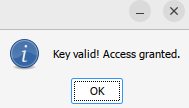
这是我的第一次逆向分析题目的尝试, 中间遇到了不少的知识点, 要不是有 AI 存在, 估计得花上不少时间, 下一次会尝试进行程序的脱壳.
另外尝试不同风格的逆向, 实验室的师兄告诉我网络安全大体分为内存安全, web 安全, 架构设计类的安全, 那么这里对二进制逆向的分析
总体而言应该是在不断的找出内存安全的问题, 至于每个体系都有每个体系更多繁杂的知识点, 以后遇到有趣的再进行尝试吧, 总体感觉如
何分析一个程序更多靠的是经验的判断以及知识面的广度.
另外在 AI 时代下, 分析一个二进制文件应该是更为简单了, 终于理解了师兄所说的, AI 时代下网络安全这门行业特别是在 web 渗透方面
已经非常简单了.